Simplifying SQL Queries with MCP from Natural Language

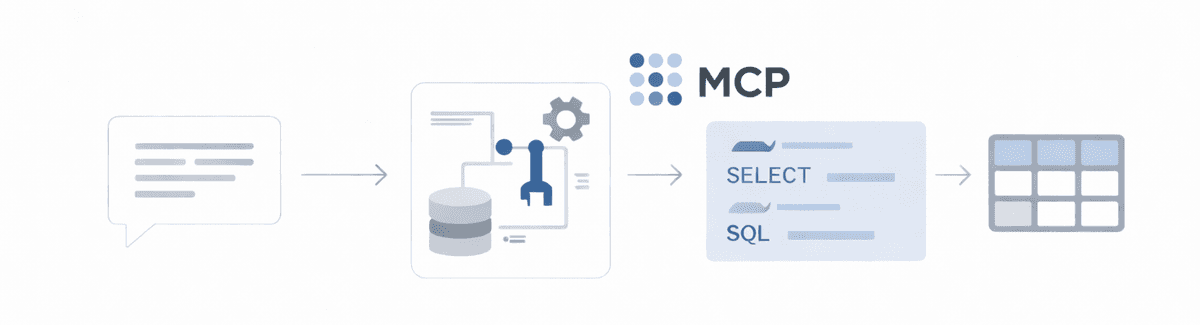
There's a lot of talk about the power of Large Language Models (LLMs) these days, and for good reason! I've been exploring how we can leverage them to make data more accessible. One fascinating application is building systems that allow non-technical users to extract insights from databases using natural language, eliminating the need for SQL knowledge. After diving into the Model Context Protocol (MCP) and its official SDK, @modelcontextprotocol/sdk, I'm excited to share how I built a system that turns natural language queries into executable SQL against a PostgreSQL database. Imagine a world without the constant demand for new analytics dashboards - where anyone can simply ask questions and AI generates the reports!
The Problem: Bridging the Gap Between Natural Language and Structured Data
Many organizations possess a wealth of valuable data residing in PostgreSQL databases. However, accessing this information often requires specialized SQL skills, creating a barrier for non-technical stakeholders. While Business Intelligence (BI) tools exist, they can have steep learning curves and might not always offer the flexibility of asking ad-hoc questions. The ideal scenario is a system where users can pose questions in plain English and receive accurate, real-time answers directly from the database.
Traditional approaches that rely solely on prompt engineering to generate SQL from natural language often struggle with reliability, understanding the nuances of the database context, and robust error handling. This is where the Model Context Protocol, especially when used with its dedicated SDK, offers a more structured and reliable solution.
Embracing the Model Context Protocol
The Model Context Protocol (MCP) provides a standardized framework for language models to interact with external systems in a controlled and predictable manner. The @modelcontextprotocol/sdk simplifies the implementation of this protocol, offering tools and abstractions to define and handle interactions between the LLM and your application.
For our natural language to SQL system, leveraging MCP and the SDK allows the language model to:
-
Dynamically Discover Database Schema: Instead of relying on schema information embedded in the prompt (which can become outdated or incomplete), the model can use MCP functions to request and receive the latest database schema details.
-
Execute SQL Queries Safely: The system can expose an MCP function that allows the model to execute generated SQL queries against the PostgreSQL database and retrieve the results.
-
Handle Errors Gracefully and Informatively: When database errors occur, the MCP framework allows for structured error reporting back to the language model, enabling it to potentially refine the query or inform the user clearly.
-
Present Results in Natural Language: After executing a query, the model can use its natural language generation capabilities to present the results in a user-friendly format.
System Architecture
Our system architecture incorporates the MCP principles to manage the interactions:
-
API Server: This component receives natural language queries from users.
-
Query Processing Service: This service orchestrates the interaction with the LLM using the
@modelcontextprotocol/sdk. It defines the MCP functions the LLM can call. -
MCP Protocol Handler: This crucial component implements the database-specific functions (e.g., fetching schema, executing queries) that the LLM can invoke through the MCP protocol. The SDK provides the necessary tools to structure these function definitions and handle requests.
-
Database Access Layer: This layer manages secure connections to the PostgreSQL database.
Prerequisites
To follow along, you'll need:
-
Basic Typescript knowledge: Our implementation will be in Typescript.
-
Basic LLM knowledge: Understanding the fundamentals of how language models work is helpful.
-
Node.js and npm (or yarn) installed: To run the backend server and manage dependencies.
-
PostgreSQL database setup: You'll need access to a running PostgreSQL instance with data to query.
-
Ollama installed (optional but recommended for local LLM): We'll be using Ollama to run a local language model.
-
Environment variables configured: For database credentials and Ollama URL (if applicable).
-
These npm packages:
-
pg: For interacting with the PostgreSQL database. -
express: To build the API server. -
cors: For enabling Cross-Origin Resource Sharing during development. -
langchain: For interacting with the language model (Ollama in this case). -
@modelcontextprotocol/sdk: The official SDK for implementing the Model Context Protocol.
-
Setting Up the PostgreSQL Connection
First, we establish a connection to our PostgreSQL database using the pg library:
import { Pool } from "pg";
import dotenv from "dotenv";

dotenv.config(); // Load environment variables from .env file

function setupDatabaseConnection() {
  // Create a connection pool
  const pool = new Pool({
    user: process.env.DB_USER,
    host: process.env.DB_HOST,
    database: process.env.DB_NAME,
    password: process.env.DB_PASSWORD,
    port: parseInt(process.env.DB_PORT || "5432"),
    max: 20,
    idleTimeoutMillis: 30000,
    connectionTimeoutMillis: 2000,
  });

  // Test the connection
  pool.query("SELECT NOW()", (err, res) => {
    if (err) {
      console.error("Database connection failed:", err);
    } else {
      console.log("Database connected:", res.rows[0].now);
    }
  });

  return pool;
}
Defining MCP Functions
Now, let's leverage @modelcontextprotocol/sdk to define the functions our language model can call. We'll define functions for fetching the database schema, executing SQL queries, and explaining a specific table.
import { createFunction } from "@modelcontextprotocol/sdk";
import { Pool } from "pg";

function initializeMCPServer(pool: Pool) {
  return {
    fetchSchema: createFunction({
      name: "fetchSchema",
      description: "Get information about database tables and their columns.",
      parameters: {
        type: "object",
        properties: {
          tables: {
            type: "array",
            items: { type: "string" },
            description: "Optional list of table names to fetch schema for.",
          },
        },
      },
      async execute(args) {
        const client = await pool.connect();
        try {
          const query = `
                        SELECT
                            t.table_name,
                            array_agg(DISTINCT c.column_name) as columns,
                            obj_description(quote_ident(t.table_name)::regclass::oid) as table_description
                        FROM
                            information_schema.tables t
                        JOIN
                            information_schema.columns c ON t.table_name = c.table_name
                        WHERE
                            t.table_schema = 'public' AND
                            t.table_type = 'BASE TABLE'
                            ${args.tables ? "AND t.table_name = ANY($1::text[])" : ""}
                        GROUP BY
                            t.table_name
                        ORDER BY
                            t.table_name
                    `;
          const params = args.tables ? [args.tables] : [];
          const result = await client.query(query, params);

          return {
            tables: result.rows.map((row) => ({
              name: row.table_name,
              columns: row.columns,
              description:
                row.table_description ||
                `Table containing ${row.table_name} data`,
            })),
          };
        } catch (error: any) {
          return { error: { message: error.message, code: error.code } };
        } finally {
          client.release();
        }
      },
    }),

    executeQuery: createFunction({
      name: "executeQuery",
      description: "Execute a SQL query against the database.",
      parameters: {
        type: "object",
        properties: {
          query: {
            type: "string",
            description: "The SQL query to execute.",
          },
          parameters: {
            type: "array",
            items: { type: "string" }, // Adjust type as needed
            description: "Optional parameters for the SQL query.",
          },
        },
        required: ["query"],
      },
      async execute(args) {
        if (!isSelectQuery(args.query)) {
          return {
            error: {
              message: "Only SELECT queries are allowed for security reasons.",
              code: "SECURITY_VIOLATION",
            },
          };
        }

        const client = await pool.connect();
        try {
          await client.query("SET statement_timeout TO 30000");
          const result = await client.query(args.query, args.parameters || []);
          return {
            rowCount: result.rowCount,
            fields: result.fields.map((f) => ({
              name: f.name,
              dataType: f.dataTypeID,
            })),
            rows: result.rows,
          };
        } catch (error: any) {
          return {
            error: {
              message: error.message,
              code: error.code,
              hint: translateErrorToHint(error),
            },
          };
        } finally {
          client.release();
        }
      },
    }),

    explainTable: createFunction({
      name: "explainTable",
      description:
        "Get detailed information about a specific database table, including columns and relationships.",
      parameters: {
        type: "object",
        properties: {
          tableName: {
            type: "string",
            description: "The name of the table to explain.",
          },
        },
        required: ["tableName"],
      },
      async execute(args) {
        const client = await pool.connect();
        try {
          const columnsQuery = `
                        SELECT
                            column_name,
                            data_type,
                            is_nullable,
                            column_default,
                            col_description((table_schema || '.' || table_name)::regclass::oid, ordinal_position) as description
                        FROM
                            information_schema.columns
                        WHERE
                            table_schema = 'public' AND table_name = $1
                        ORDER BY
                            ordinal_position
                    `;

          const relationshipsQuery = `
                        SELECT
                            kcu.column_name,
                            ccu.table_name AS foreign_table_name,
                            ccu.column_name AS foreign_column_name
                        FROM
                            information_schema.table_constraints AS tc
                            JOIN information_schema.key_column_usage AS kcu
                                ON tc.constraint_name = kcu.constraint_name
                            JOIN information_schema.constraint_column_usage AS ccu
                                ON ccu.constraint_name = tc.constraint_name
                        WHERE tc.constraint_type = 'FOREIGN KEY' AND tc.table_name = $1
                    `;

          const sampleDataQuery = `SELECT * FROM "${args.tableName}" LIMIT 5`;

          const [columns, relationships, sampleData] = await Promise.all([
            client.query(columnsQuery, [args.tableName]),
            client.query(relationshipsQuery, [args.tableName]),
            client.query(sampleDataQuery),
          ]);

          return {
            table: args.tableName,
            columns: columns.rows,
            relationships: relationships.rows,
            sampleData: sampleData.rows,
            rowCount: await getTableRowCount(client, args.tableName),
          };
        } catch (error: any) {
          return { error: { message: error.message, code: error.code } };
        } finally {
          client.release();
        }
      },
    }),
  };
}

// Helper function to validate if a query is read-only
function isSelectQuery(query: string): boolean {
  const normalizedQuery = query.trim().toLowerCase();
  return (
    normalizedQuery.startsWith("select") &&
    !normalizedQuery.includes("insert") &&
    !normalizedQuery.includes("update") &&
    !normalizedQuery.includes("delete") &&
    !normalizedQuery.includes("drop")
  );
}

async function getTableRowCount(
  client: any,
  tableName: string,
): Promise<number> {
  const result = await client.query(`SELECT COUNT(*) FROM "${tableName}"`);
  return parseInt(result.rows[0].count, 10);
}

// Basic error translation (can be expanded)
function translateErrorToHint(error: any): string | undefined {
  if (error.code === "42703") {
    return "It seems like one of the column names in your query might be incorrect. Double-check the spelling.";
  }
  return undefined;
}
Setting Up LangChain and Ollama Integration with MCP Function Calling
Here's how we integrate LangChain and Ollama, enabling the language model to call our defined MCP functions using LangChain's function calling capabilities.
import { ChatOllama } from "langchain/chat_models/ollama";
import { SystemMessage, HumanMessage, AIMessage } from "langchain/schema";
import { ChatPromptTemplate } from "langchain/prompts";

function setupLLMProcessor(
  mcpFunctions: ReturnType<typeof initializeMCPServer>,
) {
  const model = new ChatOllama({
    baseUrl: process.env.OLLAMA_BASE_URL || "http://localhost:11434",
    model: process.env.OLLAMA_MODEL || "llama2",
    temperature: 0.1,
  });

  const prompt = ChatPromptTemplate.fromMessages([
    new SystemMessage(`
            You are a helpful database assistant that translates natural language queries into SQL.
            You have access to the following functions to interact with the database:
            ${Object.values(mcpFunctions)
              .map(
                (func) =>
                  `- ${func.name}: ${func.description}\n  Parameters: ${JSON.stringify(func.parameters)}`,
              )
              .join("\n")}

            To use these functions, respond with a JSON object in the following format:
            \`\`\`json
            {
                "function": "${Object.keys(mcpFunctions)[0]}",
                "parameters": {
                    "param1": "value1",
                    "param2": "value2"
                }
            }
            \`\`\`

            If you are asked a question that doesn't require database interaction, or after you have successfully retrieved and processed the data, respond directly to the user in a clear and concise way.
            Always call 'fetchSchema' first to understand the database structure before attempting to execute any queries.
        `),
    new HumanMessage("{input}"),
  ]);

  return {
    processQuery: async function (naturalLanguageQuery: string) {
      const formattedPrompt = await prompt.format({
        input: naturalLanguageQuery,
      });
      const messages = [new HumanMessage(formattedPrompt)];
      let finalResponse: string | null = null;
      let processing = true;
      const conversationHistory: (SystemMessage | HumanMessage | AIMessage)[] =
        [messages[0]];

      while (processing) {
        const llmResponse = await model.call(conversationHistory, {
          functions: Object.values(mcpFunctions).map((func) => ({
            name: func.name,
            description: func.description,
            parameters: func.parameters,
          })),
        });

        conversationHistory.push(llmResponse);
        const responseContent = llmResponse.content;
        const functionCall = llmResponse.function_call;

        if (functionCall) {
          const functionName = functionCall.name;
          const args = JSON.parse(functionCall.arguments);

          console.log(`Calling function: ${functionName} with args:`, args);
          const functionToCall =
            mcpFunctions[functionName as keyof typeof mcpFunctions];
          if (functionToCall && typeof functionToCall.execute === "function") {
            const functionResult = await functionToCall.execute(args);
            console.log(`Function ${functionName} result:`, functionResult);
            conversationHistory.push(
              new AIMessage({
                content: `Result of ${functionName}: ${JSON.stringify(functionResult)}`,
                function_call: functionCall,
              }),
            );
          } else {
            conversationHistory.push(
              new AIMessage(`Error: Unknown function ${functionName}`),
            );
          }
        } else {
          finalResponse = responseContent;
          processing = false;
        }
      }

      return finalResponse;
    },
  };
}
Creating the API Endpoint
We create an Express API endpoint to handle incoming natural language queries:
import express from "express";
import cors from "cors";
import dotenv from "dotenv";

dotenv.config();

function setupApiServer(llmProcessor: ReturnType<typeof setupLLMProcessor>) {
  const app = express();

  app.use(express.json());
  app.use(cors());

  app.post("/api/query", async (req, res) => {
    try {
      const { query } = req.body;

      if (!query || typeof query !== "string") {
        return res
          .status(400)
          .json({ error: "Query must be a non-empty string" });
      }

      const startTime = Date.now();
      const result = await llmProcessor.processQuery(query);
      const processingTime = (Date.now() - startTime) / 1000;

      res.json({ result, processingTime });
    } catch (error: any) {
      console.error("Error processing query:", error);
      res
        .status(500)
        .json({ error: "Failed to process query", message: error.message });
    }
  });

  const PORT = process.env.PORT || 3000;
  app.listen(PORT, () => {
    console.log(`Server running on port ${PORT}`);
  });

  return app;
}
Putting It All Together
Finally, let's assemble our application, initializing the database connection, MCP functions, LLM processor, and the API server:
import dotenv from "dotenv";
import { Pool } from "pg";

dotenv.config();

async function startApplication() {
  // Initialize database connection
  const dbPool = setupDatabaseConnection();

  // Create MCP handler with functions
  const mcpFunctions = initializeMCPServer(dbPool);

  // Set up LLM processor with MCP functions
  const llmProcessor = setupLLMProcessor(mcpFunctions);

  // Create and start API server
  const app = setupApiServer(llmProcessor);

  console.log("Natural language SQL query application initialized");
}

// Start the application
startApplication().catch((err) => {
  console.error("Failed to start application:", err);
  process.exit(1);
});
Conclusion
Building a natural language to SQL system using @modelcontextprotocol/sdk offers a significant step forward in democratizing data access. By leveraging the structured approach of MCP and the tools provided by the SDK, we can create more robust and reliable systems that bridge the gap between natural language and structured data. The integration with LangChain further simplifies the interaction with language models, allowing them to intelligently utilize the defined MCP functions.
This approach empowers non-technical users to directly query databases, unlocking valuable insights without requiring SQL expertise or relying on pre-built dashboards for every question. The potential for increased efficiency and data-driven decision-making across organizations is immense. As the @modelcontextprotocol/sdk evolves, we can expect even more powerful tools and abstractions to simplify the creation of intelligent, data-aware applications.